Is it M then Codes?
PC recaps use M for the menu, then Settings, then Codes. Mobile uses the on-screen menu.

How to redeem Morioh High codes: menu then Settings then Codes tab, paste, Redeem. Not roblox.com/redeem. Place 111838814545019. Verified October 2026.
Open the menu, Settings, Codes tab. Not roblox.com/redeem.
~5 min read
How to redeem Morioh High codes is a UI path, not a second code table. Place 111838814545019 by Not A Stand Game. Community recaps (October 12, 2026) open the menu, then Settings, then the Codes tab. That is not roblox.com/redeem.
Bring the codes list in another tab. Copy one string, paste, Redeem, watch Rerolls / Arrow Shards. Play on Roblox.
| Fact | Detail |
|---|---|
| Place | 111838814545019 |
| PC menu recap | M key |
| Path | Menu → Settings → Codes |
| Website redeem | Do not use |
| New strings | discord.gg/moriohhigh |
Matched by build plan, shared topics, and guide progression — not random related links.
Load Place 111838814545019. Finish the lobby if it asks Open World vs Public School and a first-name field. Then open the in-experience menu. PC recaps press M. The Codes tab lives under Settings in the recaps we compared — not on a loading splash, and not on a separate Roblox website.
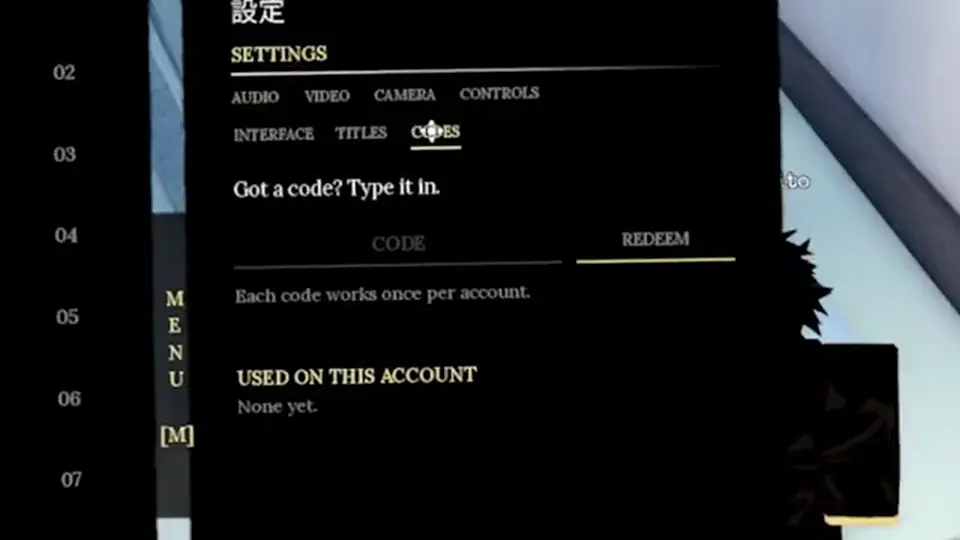
One recap redeemed after walking campus. Another redeemed after a knockout. Both still used Settings. If your HUD has a phone or a different gear icon, follow the live label that says Codes — do not invent a second path from YBA.
Once the box is open, paste is mechanical. The next section is the only string you should put in that box.
Paste the Code cell from the Morioh High codes table. Examples of recap strings: WEHEARYOUGUYS, THANKYOUFORLIKES, DELAYMBALL, PLAYERS5MVBYT, RELEASECSBKZM. Do not paste “10 Rerolls.” Do not paste spaces around the string.
| Paste this | Do not paste this |
|---|---|
| WEHEARYOUGUYS | we hear you guys (spoken form) |
| THANKYOUFORLIKES | Thank you for likes |
| RELEASECSBKZM | relis CBKZM (ASR mangled) |
| PLAYERS5MVBYT | player 5M PB YT |
Auto captions turn RELEASECSBKZM into “relis CBKZM” and PLAYERS5MVBYT into “player 5M.” Always prefer the compact Code cell over a voiceover. If Discord posts a screenshot, type what you see, not what you hear.
One recap paused campus play, opened Settings, and pasted five strings with success toasts: THANKYOUFORLIKES, WEHEARYOUGUYS, RELEASECSBKZM, PLAYERS5MVBYT, DELAYMBALL. That is evidence those compact strings existed on October 12, 2026 for that account — still Unverified for you. GAUNTLET and WHITESNAKE did not appear in that five-string run.
Another recap opened Settings around 05:21 and started with WEHEARYOUGUYS. Same path, fewer strings. If your HUD has a Codes tab in a different parent (phone, extras), follow the live label. The path we document is menu → Settings → Codes because two independent recaps used it.
Mobile players still paste the same strings. The next section is only about finding the menu button.
Morioh High codes are not PC-only. Open the on-screen menu (hamburger / gear — match live HUD), Settings, Codes. Paste from clipboard. If your keyboard inserts a trailing space, delete it before Redeem.
Use the same Settings → Codes idea. If your platform blocks paste, type carefully in caps. Do not redeem on a friend’s account “to test” — codes are typically once per account.
After Redeem, look at the HUD, not the YouTube like count.
A success toast is not a shop. Open whatever inventory or stats panel the live HUD uses and confirm Rerolls or Arrow Shards moved. If nothing moved and you got success, screenshot it — the reward might sit in a mail or a Stand menu we have not mapped.
| Result | Next action |
|---|---|
| Success + HUD moved | Next string, or bank and leave |
| Success + HUD unchanged | Screenshot; do not assume a second currency |
| Invalid | Recopy the cell; confirm Place |
| Already redeemed | Skip |
Codes are a first-session task, not the game. Return to the beginner guide or school life once the table is empty for your account.
You are on the wrong Place, in a cutscene, or looking at the Roblox escape menu instead of the experience menu. Close the Roblox leave-game dialog, press M again (PC), and look for Settings as an in-game tab. Group discord.gg/moriohhigh if the HUD changed after a patch.
Do not download a “codes APK.” Come back to the codes table and wait for Discord. Fake redeem sites steal passwords.
How to redeem Morioh High codes is the same job on day 30 as day 1: open Settings, paste one compact string, read the HUD. The table changes; the tab does not. If a patch moves Codes under a phone app, this page will follow a recap that shows the new parent. Until then, do not invent a second path from Gakuran or other school Roblox games.
If Redeem succeeds in recap footage but your toast says invalid, you are not “shadowbanned.” You are late, on the wrong Place, or typing the spoken form. Recopy WEHEARYOUGUYS as one word. Recopy RELEASECSBKZM without the ASR split. Then stop after one reject per string so you do not lock a rate-limit we have not documented.
Next: keep Morioh High Discord open so the next string is not a three-day-old recap.
PC recaps use M for the menu, then Settings, then Codes. Mobile uses the on-screen menu.
No. That page is not the Morioh High Codes tab.
Helpful if combat is live. Not listed as a hard requirement.
Treat them as case-sensitive. Copy the cell.
THANKYOUFORLIKES, WEHEARYOUGUYS, RELEASECSBKZM, PLAYERS5MVBYT, DELAYMBALL on October 12, 2026 — Unverified for you.
No. GAUNTLET and WHITESNAKE are MrGuider extras. Try them last.
No. One string per Redeem. Mixing two in one box fails both.
Wait until you control the character. Recaps opened Settings after fights, not during.
If paste is blocked, type the compact Code cell in caps. Do not type the reward sentence.
Roblox catalog codes only. Morioh High strings go in Settings → Codes.
Screenshot the HUD. Reward may sit under Rerolls, Arrow Shards, or an unmapped mail panel.
Matched by build plan, shared topics, and guide progression — not random related links.